

Creating Word .docx Templates
Xray Zero uses Docxtemplater underneath to generate Word files. The templates uploaded to the Xray Zero system must follow their template conventions. In general, all variables are considered optional and a blank is added in place of the variable. In some cases the word undefined may appear, which means the server tried to insert data for that variable but none was available.
Workflow
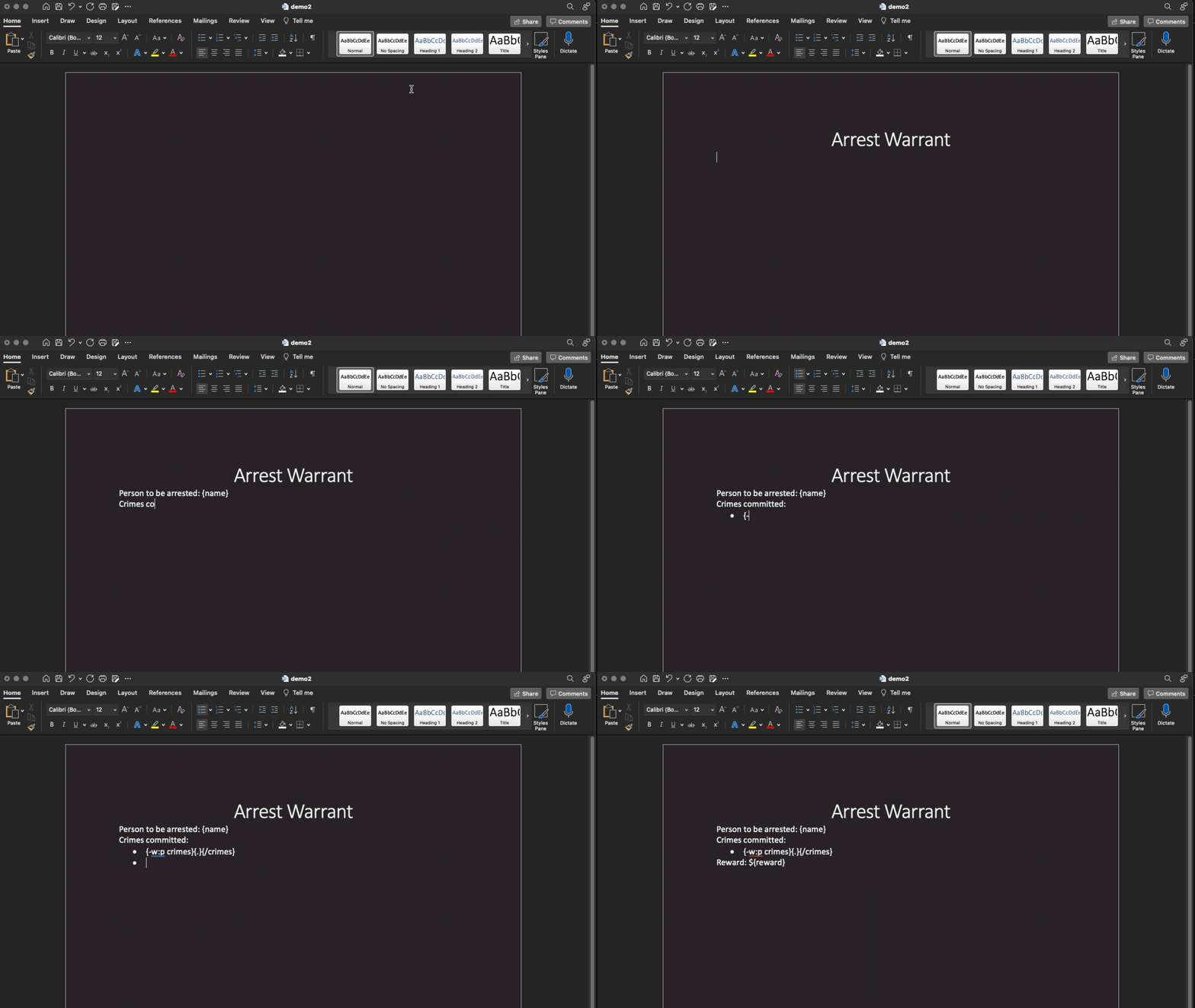
- Create a Microsoft Word
.docxfile with variables in it corresponding to a form. Use the "View Form Variables" menu item in Form Builder to see them in one place. - Upload the template under the associated form in the Admin page > Library tab.
- Fill out the web form and press the "Generate" button at the bottom.
- All the values from the web form will be inserted into the variable placeholders.
Basic Syntax
Below is some, but not all, of the template syntax. The syntax documented here covers almost all use cases.
| Syntax | Input Type | Description |
|---|---|---|
{variable} |
Any | Insert the variable's value in its place. |
{#isVariable}Stuff{/isVariable} |
Boolean | Conditionally show the word "Stuff" if isVariable is true or false. |
{#listVariable}{.}{/listVariable} |
List | Loop over listVariable filling in {.} for each item in the list (also known as an Array). |
{-w:p listVariable}{.}{/listVariable} |
List | Dash syntax: Loop over listVariable creating a new paragraph (denoted by w:p*) in each loop and inserting each item into {.}. |
{var3 = var1 + ' ' + var2} |
String(s) | Assignment syntax: Combine variables into a new single variable which acts as a placeholder where it's initialized. Optionally, an @ in front {@var = ...} prevents extra spacing in the document but also results in a raw XML string. Warning: Improperly encoded values such as & will corrupt the document (but only in assignments prefixed with @). |
{variable | cb} |
Boolean | Will insert a checkbox based on Boolean value (☒ or ☐). |
{variable | yn} |
Boolean | Will insert "Yes" or "No" based on Boolean value. |
{variable | pf} |
Boolean | Will insert "Pass" or "Fail" based on Boolean value. |
{variable | pron} |
String | Will insert "him", "her", or fall back to "them" based on whether string starts with (case insensitive) "m" or "f". |
{variable | d:'MM/DD/YYYY'} |
String | Formats a date (YYYY-MM-DD) using any Moment.js format string, ie. 'Do [day of] MMMM, YYYY' for a formal verbose date. |
{variable | d:'HHmm'} |
String | Formats a time (HH:mm a) using any Moment.js format string, ie. 'HHmm' for 24-hour time. |
{variable | uia} |
String | Prepends a string with its uppercase indefinite article (A/AN). |
{variable | lia} |
String | Prepends a string with its lowercase indefinite article (a/an). |
{variable | jc} |
List | Join list items with commas and spaces into one string, ie. [a,b,c] becomes a, b, c. |
* w:p is a WordprocessingML tag used by the modern Microsoft Word .docx format. Additional tags may be used here; however, you will need to reference additional documentation. For example, w:tr could be used to loop over table rows.
Variables
Any variables that say (Computed Variable) are created on the server — they are not in user input forms.
Global
These variables are available to all templates:
| Label | Variable | Type | Notes |
|---|---|---|---|
| Today's date (Computed Variable) | today |
Text | Month, Day Year |
| Today's formal date (Computed Variable) | todayFormal |
Text | Do [day of] MMMM, YYYY |
| Today's short date (Computed Variable) | todayShort |
Text | Mo/Dy/Yr |
| Current day (Computed Variable) | day |
Text | Numeric day with ordinal indicator ("st", "nd", etc.). |
| Current month (Computed Variable) | month |
Text | Full name of month. |
| Current year (Computed Variable) | year |
Text | Four digit year. |
| Current time (Computed Variable) | now |
Text | Current 24-hour time, e.g. "2210". |
| Left Brace | bl |
Text | Literally "{" to avoid syntax errors. |
| Right Brace | br |
Text | Literally "}" to avoid syntax errors. |
Profile/Agency Config
Additional defaults may be set at both the User and Agency level.
Variables from the logged-in User's profile are used first, then the corresponding Agency globally configured variable if not defined.
| Label | Variable | Type | Notes |
|---|---|---|---|
| USER DATA | |||
| Name | deputy |
Text | Name of the user. |
| EID/Badge | eid |
Text | User's EID or badge number. |
email |
Text | User's email address. | |
| Division | division |
Text | User's assigned division. |
| Title | title |
Text | User's title (such as "Deputy" or "Officer"). |
| I Love Me Statement | lovemestatement |
Text | Text typically used for officer qualifications in warrants. |
| AGENCY DATA | |||
| Agency Name | agency |
Text | Name of the agency. |
| Agency ORI | ori |
Text | Originating agency identifier. |
| Bonding information | bondingInformation |
Text | Default value for bonding information. |
| Division | division |
Text | Default value for division when not defined at the User level. |
| Title | title |
Text | Default value for title (such as "Deputy" or "Officer") when not defined at the User level. |
| County | county |
Text | Agency county. |
| Judicial District | district |
Text | Agency judicial district. |
Aliases
The following aliased variables can be used in place of the default Xray Zero variables for convenience. Look up the Xray Zero variable elsewhere in this documentation for further details on where it is used.
| Alias | Xray Zero Variable |
|---|---|
badge |
eid |
cr |
crn |
dlnum |
oln |
dlstate |
ols |
dob |
defendantDob |
narrative |
affidavit |
officer |
deputy |
social |
ssn |
time |
now |
Widget Variables
Widgets used in Form Builder may have specific variable names for the type of data collected by them.
Offense Picker
Offenses are a List of Objects. Each object has the following variables:
| Label | Variable | Type | Notes |
|---|---|---|---|
| Name of offense | {name} |
Text | |
| Offense code | {code} |
Text |
Person Picker
| Label | Variable | Type | Notes |
|---|---|---|---|
| Name | name |
Text | Required. |
| Date of birth | dob |
Text | Required. |
| Age | age |
Text | Not input by user. Calculated from date of birth. |
| Social security number | ssn |
Text | Collected optionally. |
| Race | race |
Text | Collected optionally. |
| Sex | sex |
Text | Collected optionally. |
| Generic description | description |
Text | Collected optionally. |
Preset Picker
Presets are a List of Text items which means there are no variables. Each item in the list is just a simple string which means it is represented by a dot: e.g. {#presets}{.}{/presets}.
Co-Defendants
A List of Objects representing additional defendants. The variable name is fixed as codefs. Each entry has the following:
| Label | Variable | Type | Notes |
|---|---|---|---|
| Name | name |
Text | Always collected. |
| Date of Birth | dob |
Text | Always collected. Format is not validated; appears as typed. |
| Race | race |
Text | Collected only when "Collect demographics?" is enabled in builder. |
| Sex | sex |
Text | Collected only when "Collect demographics?" is enabled in builder. |
Loop in templates with {#codefs}{name}, dob {dob}{/codefs} (or {-w:p codefs}...{/codefs} for one paragraph per defendant).
Inventory Picker
Used by vehicle inspection forms. Produces a List of Objects, one per selected inventory. Each inventory has its own list of items.
| Label | Variable | Type | Notes |
|---|---|---|---|
| ID | id |
Text | Inventory identifier. |
| Name | name |
Text | Inventory display name. |
| Items | items |
List | List of Objects (see below) — the inspection points and values for that inventory. |
Each entry in items:
| Label | Variable | Type | Notes |
|---|---|---|---|
| Name | name |
Text | Item label. |
| Value | value |
Any | The collected value. Shape depends on type. |
| Type | type |
Text | One of text, number, or boolean (use {value | cb}). |
Nested loop pattern in templates:
{#inventories}
      {name}
      {#items}
        {name}: {value}
      {/items}
    {/inventories}